

Hey Amazon sellers 👋 Big news just dropped: Amazon is changing how product listings are organized.
Between September 2, 2025, and November 30, 2025, Amazon is removing certain variation themes from product templates, especially those that are outdated or rarely used.
If you use parent-child listings for options like color, size, or style, this update could have a major impact on your catalog. Let’s break it down.
🧐 What’s Actually Changing?
Amazon wants to simplify and clean up listings by removing old variation themes. If you see Deprecated: Do not use in the Variation theme name field, that is your warning sign that the theme is being phased out.
Once the removal period begins, trying to update a listing with a deprecated theme may trigger this error:
“The value specified is invalid.”
In simple terms: your update will fail until you rebuild the variation structure correctly.
🤔 Why Does This Matter for Sellers?
Parent-child listings are important for discoverability and conversion. If your products use a variation theme that is being removed, here is what could happen:
- Your parent listing structure could break apart
- Child ASINs could become standalone listings
- Shoppers could get confused because size, color, or style selections may no longer appear together
Bottom line: If you do not update your listings, your variations could become disconnected, which may lead to lost sales.
🛠️ How to Update Your Listings
Amazon recommends the following steps to keep your catalog in good shape:
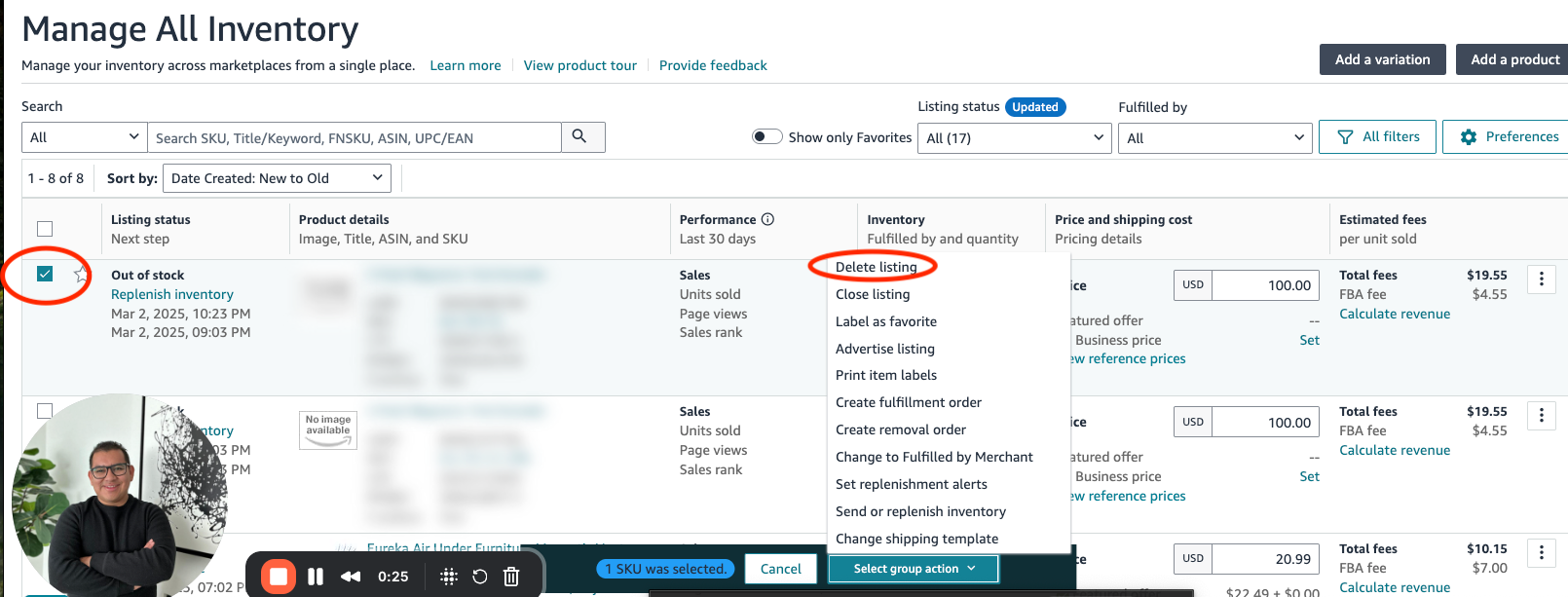
👉 Delete the old parent ASIN from Manage Inventory
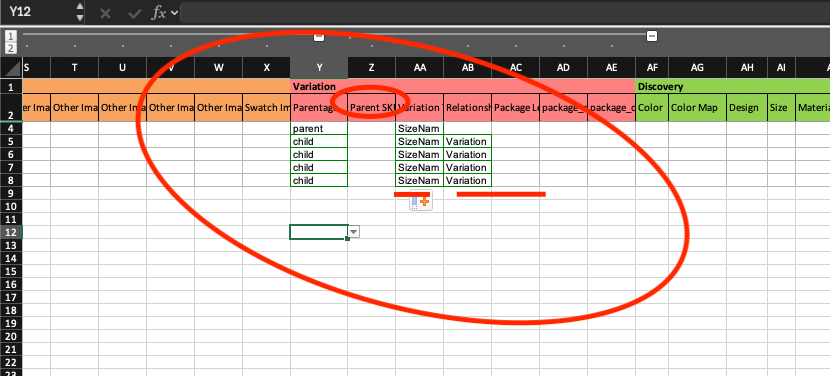
👉 Remove the old relationship attributes from all child ASINs connected to that parent. This includes:
- Parentage level
- Child relationship type
- Parent SKU
- Variation theme name
👉 Create a new parent ASIN using a valid variation theme
👉 Reassign your child ASINs to the new parent ✅
This rebuilds your parent-child structure using only approved variation themes.
😬 What If You Don’t Update?
If you skip these steps, your child ASINs will not disappear. They will remain live as standalone listings, but without variation links. Customers may still be able to buy them, but the experience will be less convenient, and you may lose the benefits of a unified listing.
🚀 The Bottom Line
Amazon’s goal is to create a cleaner and more consistent shopping experience. For sellers, this means a bit of extra work now, but it is also a good opportunity to clean up your catalog and make sure your listings are properly optimized.
Action Step: Review your variation themes now, rebuild where needed, and be ready before November 30, 2025. The faster you adapt, the smoother your transition will be.
📈 Want help optimizing your listings?
Visit getricardo.com and let’s scale your brand together.