

TikTok Shop is now available to everyone, and I’d like to walk you through the recommended setup steps to get started the right way.
The time required to complete the setup depends on the size of your catalog and can range from 5 to 40 hours. On top of that, you should plan to spend about 10 hours per month managing your TikTok Shop efficiently. If you plan to use affiliate marketing, you should also dedicate around 5 hours per month to networking with creators, which can help drive more sales.
Let’s go step by step.
Step One - Registering with TikTok Shop
If you meet all eligibility requirements, you can apply for a TikTok Shop in just a few minutes. Once your application is approved, you can move on to Step Two. Below is the link to get started.
Link: https://seller-us-accounts.tiktok.com/
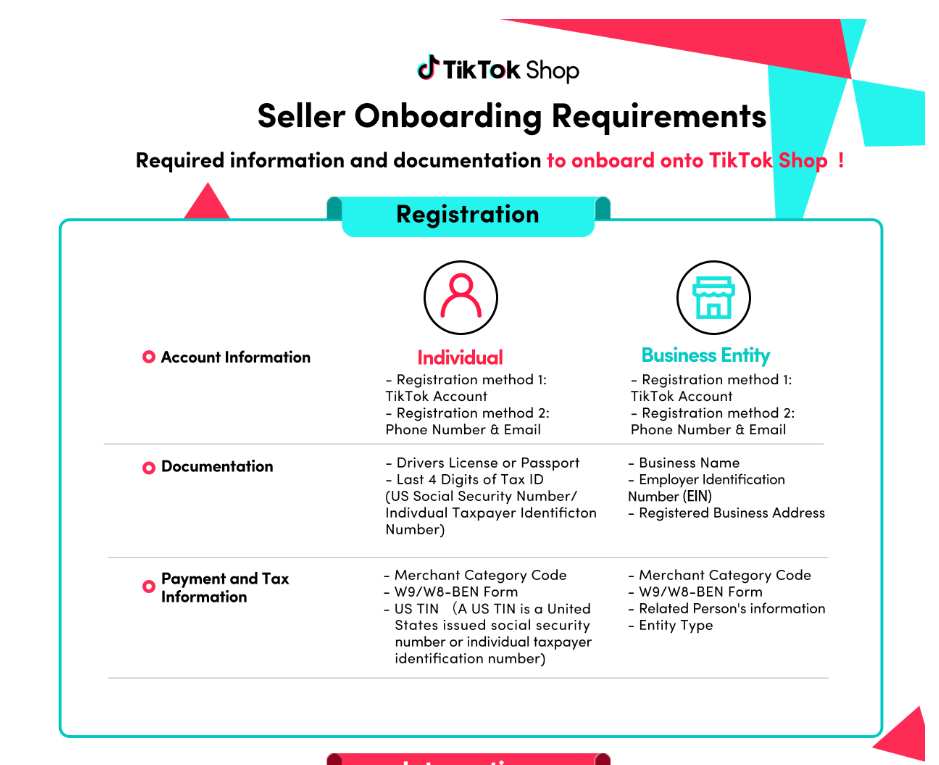
After you complete the application, TikTok will verify your identity using documents such as a certificate of incorporation, a U.S. passport, or a U.S. driver’s license. This step can take around 10 to 30 minutes.
After that, it can take 2 to 6 business days to receive an answer from TikTok Shop.
Step Two - Connecting Users and Other TikTok Services
To make sure everything runs smoothly, it is important to create strong connections from the beginning. I recommend documenting the process internally so everyone on your team stays aligned and avoids issues later on.
- Adding users: I highly recommend adding at least three users.
- Connect your TikTok app (personal or business) to the TikTok Shop.
- Connect your business TikTok account and ad account to your TikTok Shop. Make sure your TikTok user is already connected to your business TikTok account.

Step Three - Fulfillment & Shipping Settings
I highly recommend setting up your fulfillment preferences, shipping options, and shipping templates early. Most of these sections are fairly simple to complete.
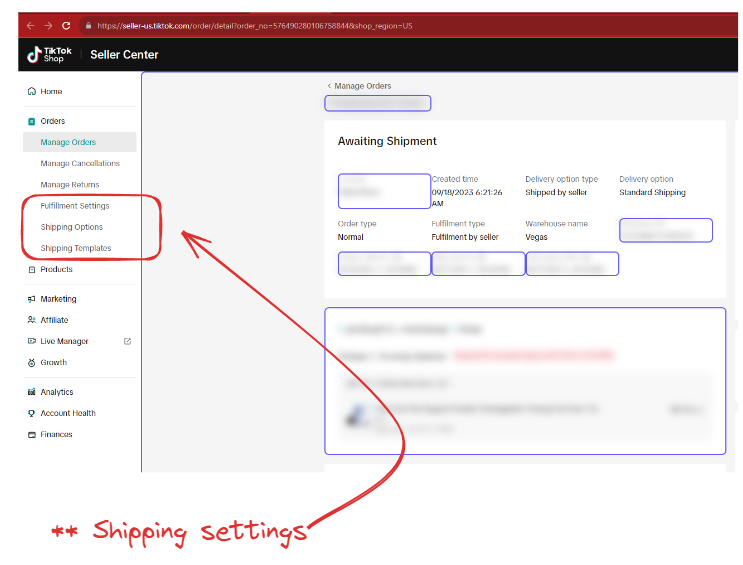
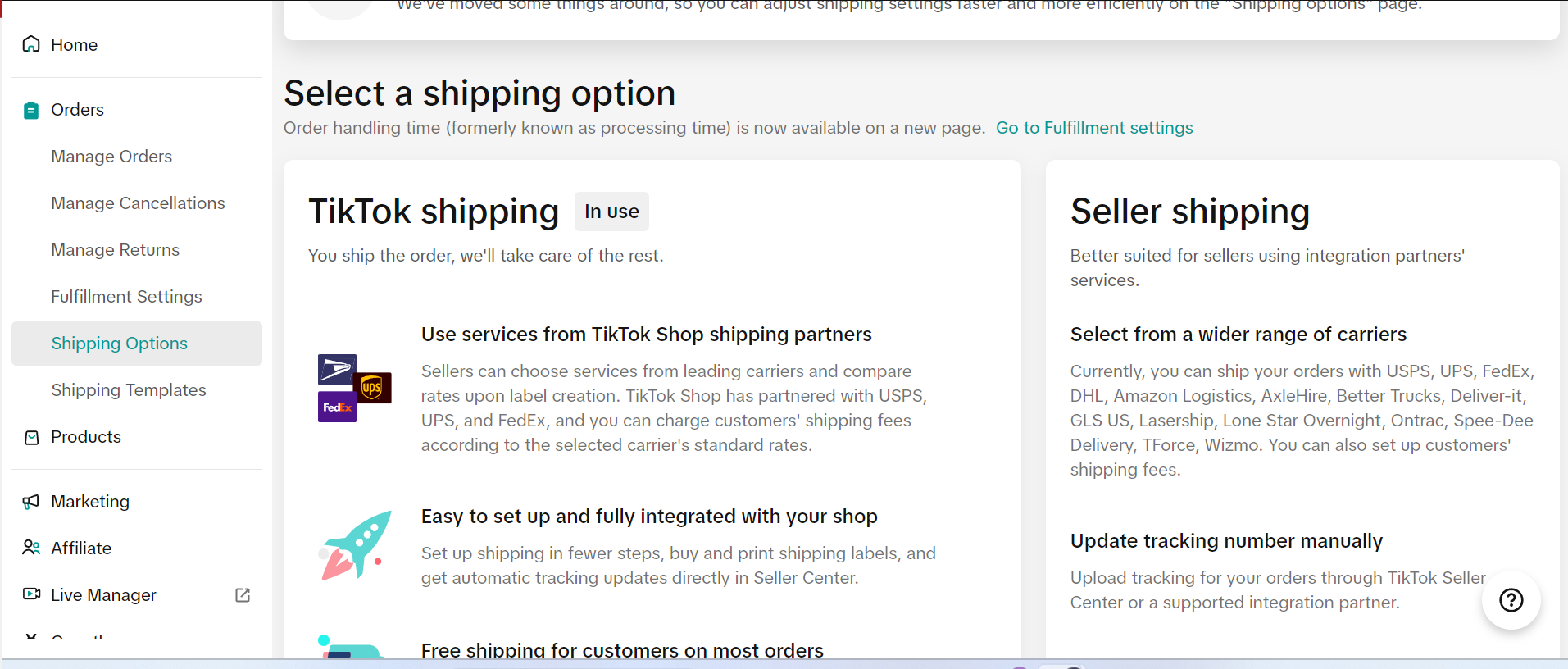
For shipping options, if you will be pushing orders from TikTok to Shopify, choose Seller Shipping. If you plan to buy shipping labels directly from TikTok, select TikTok Shipping.
Step Four - Product Setup & Uploads
This setup is essential because it determines how your products will be managed. There are three main ways to connect your catalog.
- Manually list products one by one (recommended for small catalogs)
- Bulk upload products using a template (recommended for mid-size and large catalogs)

3. TikTok also allows you to synchronize data between systems for smoother integration. This can be automated by installing the TikTok Shop app on Shopify or by using CedCommerce. This method allows Shopify to push inventory, pricing, and product data into TikTok. From there, you can use Amazon MCF or fulfill orders from your own warehouse.

[Existing TikTok Shop Sellers Only]
- If you are using connector apps to manage your TikTok Shop through Shopify, make sure those apps and services are compatible with the TikTok for Shopify app. If not, disconnect incompatible apps before connecting, because incompatibilities can create order status issues.
- If you are already an existing TikTok Shop seller, it is best to complete any pending or unfulfilled orders, including returns and refunds, before connecting to the TikTok for Shopify app. Existing TikTok Shop orders and updates to those orders will not sync to Shopify and must continue to be managed inside Seller Center.
The catalog process is the most time-consuming part, and around 75% of your setup time will usually go into this stage.
If you already sell on Shopify and fulfill orders from your warehouse, but want to use your FBA inventory to fulfill TikTok orders, then Amazon MCF can help.
- You may need to create a TikTok-only SKU for Amazon MCF and then map the TikTok SKU to your Amazon SKU inside the MCF platform.
- You will also need to create a shipping option based on Amazon MCF shipping methods.

Step Five - Get Traffic and Sales Through Ads or Creators
There are two main ways to drive traffic and sales to your TikTok Shop. The first is through paid advertising. As mentioned in Step Two, connecting your business TikTok account and ad account to your TikTok Shop allows you to launch campaigns and send traffic directly to your shop.
The second is to work with TikTok creators through the platform’s affiliate marketing program. This program usually offers creators commission rates between 5% and 20% for every sale they generate. TikTok handles creator payments, which saves time and can help you build stronger creator relationships. You can access the affiliate program inside TikTok Seller Center.

Sharing a Client Success Story
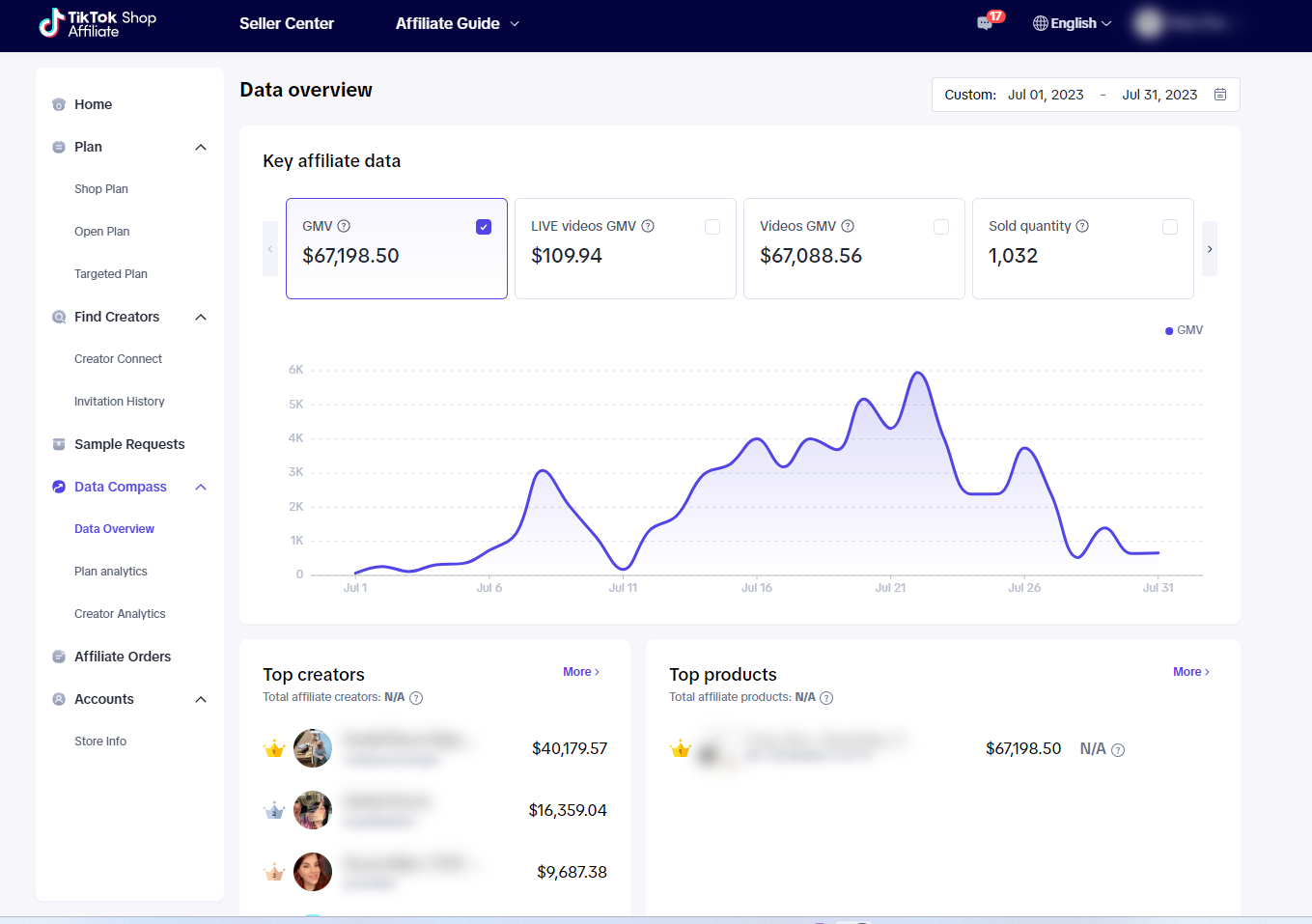
I’m excited to share the following story. I partnered with an amazing client who sells three different types of fans. We decided to launch their TikTok Shop during the TikTok beta phase and connect with creators. It was rough at first, but we stayed consistent. After a few weeks, we found success through strong creators who helped generate meaningful sales. It was a learning experience, but I’m proud of the progress we made.
We added a creator who was 60+ years old, and that creator generated an impressive $40,179.57 in sales by going live on TikTok and sharing videos on their profile. It is a great reminder that it is never too late to try something new and succeed in unexpected places.
I know this article is long, but it should help make your TikTok launch much easier. If you get stuck and want to jump on a quick 15-minute meeting, sign up by clicking the subscribe button and send me a message. I’ll share my calendar link with you.