

This is Hayim Paices from David Ricardo, and today I want to share a story about Walmart Marketplace.
Three weeks ago, Walmart Marketplace gave me one of the biggest scares I’ve had in a while. I know I’m a little late sharing this here, but I did post about it on LinkedIn when it happened.
More than ever, it is important to take the right precautions to secure your Walmart account and assign the proper access to users.
You’ll find the full story below, along with a video I made about how to implement two-step authentication for Walmart Marketplace.
Video story and how to set up 2-step verification
It was a crazy way to start a Sunday. Around 9:30 a.m., I received an email from Walmart Marketplace saying that my client had added Hayim Paices—@hotmail.
I immediately looked into it because that was a major 🔺 red flag.
I tried to remove the user right away, but the page refreshed and I was logged out before I could click the button.
I then attempted to reset my password, but instead of being able to reset it, I received an error saying: “Sorry, we don’t recognize your email address.”
All of the company’s users had been deleted. 😭😡
At that point, we knew the Walmart Marketplace account had been hacked.
Link to the post and Walmart Account Manager replies 👇

I quickly contacted my Walmart Marketplace representative, and he went to work. After 5 hours, they removed the hacker, restored the owner of the account, and fixed the issue. If you don’t have a Walmart Marketplace rep, I highly suggest getting one.
How to set up two-step authentication
Follow the directions below 😄 👇
All users on your Walmart Seller Center account should have two-step authentication enabled, whether they only have view/write access or full admin rights.
Steps:
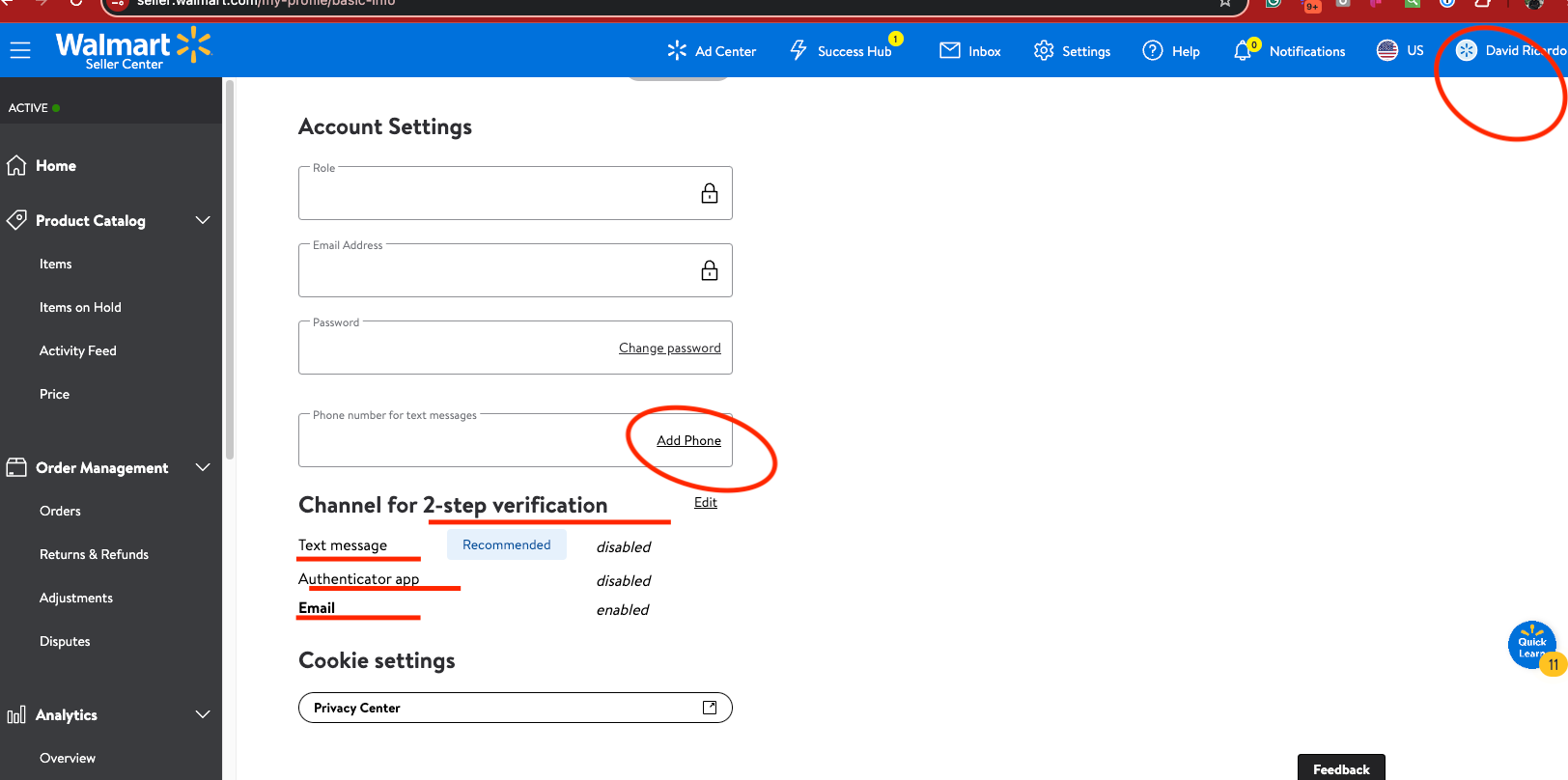
- Log in to Walmart Seller Center 👉 click your name on the top right 👉 click My Profile.
- You will be directed to Account Settings. Scroll down until you find the section for 2-Step Verification. I recommend using text and email, or an authenticator app if you already have one.
If you are not familiar with authenticator apps, I included two links below for Google Authenticator—one for Android and one for Apple.


Has your Walmart account been hacked and you need help? Let us know, and we’ll try to connect you with a Walmart representative who may be able to help.